Reverse Rollover (IRA to TSP)
A real world example
We’ve talked a lot about moving money from TSP to an IRA. From time to time people want to move money from an IRA back into TSP. Not nearly as popular but it has its place.
One subscriber was gracious enough to chronicle his rollover in very precise detail so that I could share it with you. This is his experience. His money came from Fidelity but they will all be pretty similar.
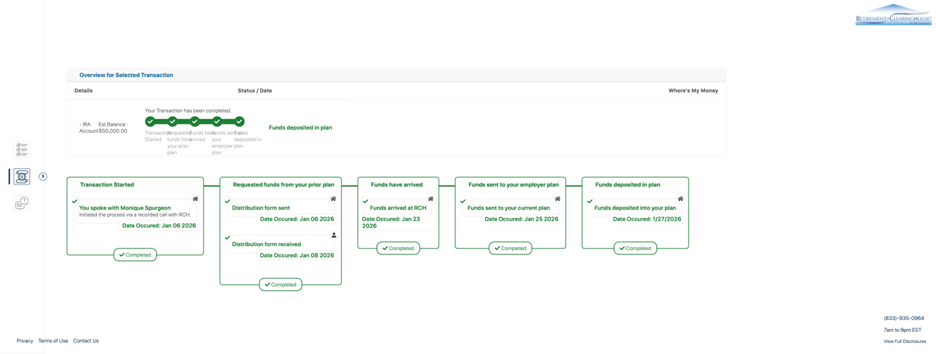
Timeline Summary for those of you in a hurry:
1/6/26 Initiated
1/8/26 Distribution paperwork received and signed
1/9/26 Fidelity withdraws funds
1/23/26 Clearinghouse confirmed funds received (check-clearing phase began)
1/25/26 Funds sent to TSP
1/27/26 Funds deposited in TSP
Total elapsed time: 21 days
Details for those of you who want, well…details:
STEP ONE 1/6/26
Initially tried the self-service option on the TSP website. That never materialized and he decided to go with the concierge option. [I have heard this from multiple sources as well. I think based on what everyone is telling me, concierge seems the way to go.]
Note: If you do not do the concierge option, you cannot later call and get them to help you if something goes wrong.
Mechanics:
Call Assisted Rollover-in Concierge
State clearly Traditional IRA to TSP
Provide IRA custodian (In this case it was Fidelity)
TSP initiates a conference call with Fidelity
They discuss specific requirements among themselves
You record your verbal authorization
STEP TWO 1/6/26
Maybe a continuation of Step One? But regardless, you should receive an email from the Retirement Clearinghouse confirming the rollover case is open, you have an authorization and you have access to a secure tracking site. This tracking site should show that the transaction has been started, and the distribution form was sent to Fidelity.
In other words, you should see some traction immediately.
STEP THREE 1/8/26
Distribution form received by Fidelity. Receipt observed in the aforementioned tracking site.
STEP FOUR 1/8/26 (Critical)
You receive a DocuSign request and must:
1. Download the entire document set (~10 pages)
2. Print all pages
3. Hand-sign where required
4. Scan the full document
5. Upload it back into DocuSign
⚠️ Known failure mode:
If the PDF is too large, DocuSign may hang with no error.
Fix by compressing the file and re-uploading.
Once accepted, the process resumes automatically.
STEP FIVE 1/9/26
Fidelity executes withdrawal.
(Jeopardy music playing…..)